Understanding Internet Communication: A Simple Guide to TCP, UDP, and HTTP
Learn when to use reliable TCP, fast UDP, or web-friendly HTTP in your applications

Before diving into TCP, UDP, and HTTP, let's quickly check how internet communication is organized. Assume it like a 7-story office building where each floor has a specific job , this is called the OSI Model (Open Systems Interconnection), created in the 1980s to help different computer systems talk to each other with somewhat standards.
The 7 Layers (From Top to Bottom)
Layer 7: Application     | HTTP, Email, File Transfer
Layer 6: Presentation    | Encryption, Compression
Layer 5: Session         | Managing Connections
Layer 4: Transport       | TCP, UDP (Our Heroes!)
Layer 3: Network         | IP Routing
Layer 2: Data Link       | WiFi, Ethernet
Layer 1: Physical        | Cables, Radio Waves
Layer 7 - Application: Where we live! Our browser, email, apps anything which we directly interact with. HTTP lives here.
Layer 6 - Presentation: The translator , which handles encryption, file formats (JPEG, ZIP) and data conversion. Mostly we can’t see it.
Layer 5 - Session: The conversation manager, that keeps track of who's talking to whom and for how long. Like login sessions.
Layer 4 - Transport: The delivery department! , TCP and UDP live here—deciding whether to send data reliably (TCP) or fast (UDP).
Layer 3 - Network: The GPS navigator, that figures out paths across the internet using IP addresses. Our data's routing system.
Layer 2 - Data Link: Our local network manager, which handles WiFi, Ethernet, and communication within our immediate network ( ISP ).
Layer 1 - Physical: The actual wires, radio waves, and electrical signals carrying our data.
Why This Matters for understanding TCP/UDP and HTTP
HTTP (Layer 7) creates the conversation: "Please send me that webpage"
TCP/UDP (Layer 4) handles delivery: "We'll make sure it gets there safely/quickly"
IP (Layer 3) finds the route: "I know how to get there"
Everything else handles mostly the physical journey
Think like we are sending a letter: We write it (Layer 7), put it in an envelope with tracking (Layer 4), address it (Layer 3), and the postal system handles the rest (Layers 1-2).
Let’s begin with networking heroes...
Have you ever wondered how computer knows exactly how to send a message to a server thousands of miles away? Or how YT streams videos to millions of users simultaneously? The answer lies in the fundamental protocols that power the internet: TCP, UDP, and HTTP.
Think of the internet as a massive postal system. Just like the postal service needs rules about addressing, packaging, and delivering parcel, the internet needs protocols—sets of rules that govern how data is sent and received between computers.
The Need for Rules in Digital Communication
Imagine we trying to send a package without any postal system rules. How would the delivery person know where to take it? How would we know if it arrived safely? The same challenges exist in digital communication, that’s why we have protocols like TCP and UDP to handle data transport, and HTTP to structure web communication.
TCP: The Reliable Courier Service
Transmission Control Protocol (TCP) is like a premium courier service that guarantees our package will arrive safely, in the right order, and exactly as we sent it.
How TCP Works (The Analogy)
Imagine we are sending a 1000-page book to our friend:
Connection Setup: TCP first calls our friend to say "Hey, I'm about to send you a book in multiple packages. Are you ready?"
Reliable Delivery: It breaks the book into numbered chapters, sends them one by one
Acknowledgment: Our friend confirms receiving each chapter: "Got chapter 1", "Got chapter 2"
Error Correction: If chapter 5 goes missing, friend says "I didn't get chapter 5", and TCP resends it
Ordered Assembly: Even if chapters arrive out of order, TCP ensures they're reassembled correctly
Connection Teardown: Once complete, TCP says "Book delivered successfully, closing connection"
TCP Characteristics
Reliable: Guarantees data arrives intact
Ordered: Data arrives in the correct sequence
Error-checked: Detects and corrects transmission errors
Flow control: Manages data flow to prevent overwhelming the receiver
Slower: As all these safety checks take time
Higher overhead: Requires more network resources
UDP: The Fast Announcement System
User Datagram Protocol (UDP) is like a radio announcement , broadcasts information quickly but doesn't guarantee everyone heard it correctly.Just like throwing multiple objects and catching all of them , Some of might be dropped.
How UDP Works (The Analogy)
Imagine we are announcing sports scores over a stadium loudspeaker:
No Setup: We just start talking—no need to check if everyone's listening
Fire and Forget: We shout "Team India: 300 runs 0 wicket" and move on
No Confirmation: We don't wait for all the people to confirm they heard us
Fast Updates: We can rapid-fire announce score updates as they happen
No Guarantees: Someone might miss an announcement due to noise.
UDP Characteristics
Fast: Minimal overhead means speedy delivery
Efficient: Uses fewer network resources
Simple: No complex handshaking or error recovery
Unreliable: No guarantee data arrives
No ordering: Data might arrive out of sequence
No error correction: Corrupted data is simply discarded
Key Differences: TCP vs UDP
| Aspect | TCP | UDP |
| Reliability | Guaranteed delivery | Best effort delivery |
| Speed | Slower (due to safety checks) | Faster (minimal overhead) |
| Connection | Connection-oriented | Connectionless |
| Data Order | Maintains order | No order guarantee |
| Error Handling | Detects and corrects errors | Detects errors, discards bad data |
| Use Case | When accuracy matters ( Whatsapp Messages ) | When speed matters ( LIVE Straming ) |
When to Use TCP
TCP can be chosen when data integrity and reliability are more important than speed:
TCP Scenarios:
Text Communication: Intact message pass on
Web Browsing: HTML, CSS, and JavaScript files must be perfect in original form
Database Operations: Financial transactions cannot have missing data
Online Shopping: Order details must be 100% accurate
Real-World TCP Example:
When you download a 2GB movie file, TCP ensures:
Every single bit arrives correctly
The file can be played without corruption
If your internet hiccups, TCP resends any lost parts
You get a perfect copy, even if it takes a bit longer
When to Use UDP
UDP can be chosen when speed and real-time performance matter more than perfect accuracy:
Perfect UDP Scenarios:
Live Video Streaming: Better to skip a few frames than pause the stream
Online Gaming: Player movements need instant updates
Voice/Video Calls: A tiny bit of audio dropouts is better than delayed conversation
DNS Lookups: Quick domain name resolution
Live Sports Updates: Getting scores fast matters more than perfect delivery
Real-World UDP Example:
In Valorent like tactical shooter game:
Our character's position needs to update multiple times per second
If someone’s position update is lost, the next one makes it irrelevant
Stopping to resend old positions would make gameplay choppy
For smooth gameplay speed is more relevant then perfection
What is HTTP and Where It Fits
HTTP ( Hyper text transfer protocol ) is a completely different type of protocol then TCP/UDP.
It lives on the Application layer, while TCP/UDP live on the Transport layer. They work together, not in competition.
We can not get server file directly to our browser there are set of rules which needs to be followed , HTTP contains methods ( GET , POST , PUT , PATCH , DELETE ) and various response data formats.
What HTTP Actually Does
HTTP is like a standardized conversation format for web communication. It defines:
How to ask for web pages: "GET /index.html please"
How to submit forms: "POST this data to /submit"
How to structure responses: "Here's your HTML with status 200 OK"
What different status codes mean: 404 = Not Found, 500 = Server Error
HTTP Example:
When we visit a website, our browser speaks HTTP:
Browser: "GET /homepage.html HTTP/1.1"
Server: "HTTP/1.1 200 OK
         Content-Type: text/html

         <html><body>Welcome to our site!</body></html>"
The Relationship Between TCP and HTTP
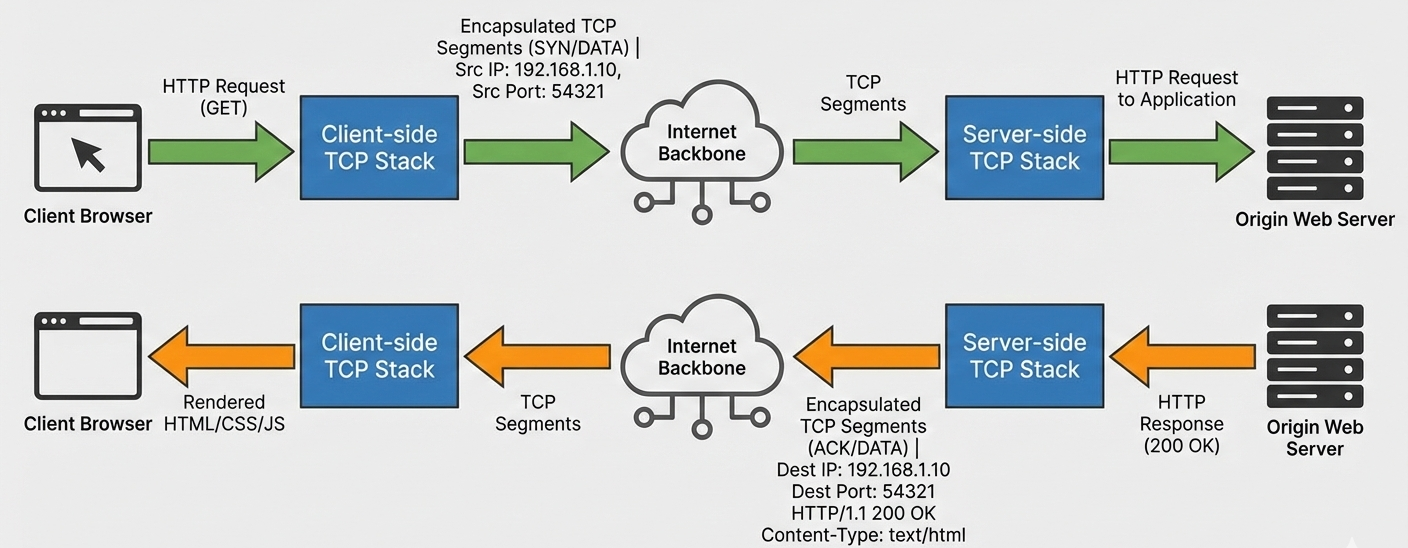
Here's the crucial understanding: HTTP runs ON TOP OF TCP. They work as a team:
The Layered Approach:
HTTP creates the message: "Please send me the homepage"
TCP handles reliable delivery: "I'll make sure this request gets there safely"
IP handles routing: "I'll find the path to the destination server"
Physical networks carry the data: WiFi, fiber optics, etc.
A Real-World Analogy:
HTTP = The content of your letter ("Dear Friend, how are you?")
TCP = The postal service (reliable delivery, tracking, confirmation)
IP = The addressing system (street addresses, zip codes)
Physical = The actual trucks, planes, and mail carriers
Common Confusion
Is HTTP the same as TCP ?
No! HTTP is what we say, TCP is how we say it reliably. HTTP defines the conversation format, TCP ensures the conversation reaches its destination.
Does HTTP replace TCP ?
No! HTTP needs TCP to work. When we browse a website using HTTP, TCP is working behind the scenes to ensure all the web page data arrives correctly.
Can HTTP use UDP instead of TCP?
Generally no for traditional web browsing. Web pages need to arrive complete and accurate. However, newer protocols like HTTP/3 use QUIC, which is built on UDP but adds its own reliability features (another rabbit hole for deep diving).
Visual Understanding: HTTP Over TCP Connection
Here's how an HTTP request flows over a TCP connection:
Choosing the Right Protocol for Your Project
Use TCP when:
Data accuracy is critical
You can't afford to lose information
Order of data matters
You're building: web applications, file transfers, databases, messaging systems
Use UDP when:
Speed is more important than perfection
You're sending frequent small updates
Slight data loss is acceptable
You're building: games, live streams, real-time monitoring, voice/video calls
Use HTTP when:
You're building web applications
You need standardized request/response patterns
You want to leverage existing web infrastructure
You're creating REST APIs or web services
Conclusion
Understanding TCP, UDP, and HTTP is like learning the fundamental rules of internet communication:
TCP is your reliable postal service—slow but guaranteed
UDP is your fast megaphone—quick but no guarantees
HTTP is your web conversation language—built on top of TCP's reliability
The internet doesn't force you to choose just one. Modern applications often use all three:
HTTP over TCP for web pages and API calls
UDP for real-time features like live chat or notifications
TCP for critical data like user profiles and transactions
Next time you're designing an application, ask yourself: "Do I need the reliability of TCP, the speed of UDP, or the web-friendly structure of HTTP?" Often, the answer is a combination of all three!
These protocols aren't competitors , they're teammates working together to make the internet work seamlessly for billions of users every day.


